Check what the demo wallet represents
The provider links to a demo casino. In the recorded session reviewed for this guide, that casino's wallet identifies itself as a demo, offers test funds and says it has no real-money payments. The interface resembles an operator dashboard, but its balance has a testing purpose. That observation applies to the recorded demo, not automatically to another destination.
Before treating a balance as meaningful, find its label and the surrounding explanation. Test credit, a carried game amount and an account balance are separate things. Adding simulated funds is not a cash deposit, and a result inside a sandbox is not a withdrawable prize. An interface that looks familiar does not erase those distinctions.
Record enough context to recognise the version
A useful observation starts with the destination and date. Note the exact game title, the provider name where it is shown, whether a login is already active and which mode is selected. A screenshot of gameplay alone leaves those facts out. An already-authenticated launch also cannot prove that the same route works for an anonymous visitor.
The saved recording reaches gameplay after the user returns from a test wallet to the lobby. It does not show registration or the original sign-in. Current complete public access was not verified on 2026-10-08. An access problem is a reason to record the error and destination, not evidence by itself that the product has been discontinued.
- Destination URL and observation date
- Game title, provider label and selected mode
- Demo or real-money label and login state
- Device, browser and visible control instructions
Observe steering and boost as separate inputs
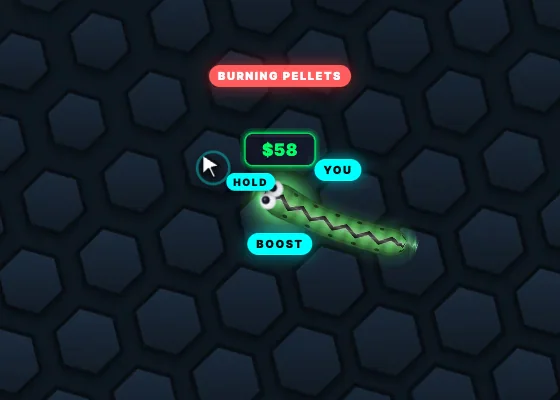
The archived tutorial uses mouse-pointer steering on desktop and a held left mouse button for boost. On mobile, the first finger steers through a joystick-style control and the second finger boosts. Start by identifying which instructions the version on your screen actually provides. Do not assume an input seen in a desktop video is the mobile input too.
A brief observation at normal speed, followed by a short boost and release, can show whether you understand the two inputs. Watch the carried amount as well as movement: the saved rules say boost consumes pellets. Record what the display does without inventing a fixed consumption rate. Current economy settings were not independently verified in this research.
Look for the stages behind the cashout number
In the saved client, the target is 50× the entry fee. Eligibility precedes starting cashout, a thirty-second survival countdown and a fifteen-second window to cross the enabled green boundary. These are dated demo instructions. A current version's own help and target display remain the reference if they differ.
For an observation log, write down the stage labels and boundary colours rather than only the largest amount visible. Was the button merely unlocked? Was the countdown running? Was the exit window active? Was a completed result shown? Those distinctions explain more than a single screenshot of a gold progress bar or a number above a snake.
Note browser behaviour without calling it universal compatibility
The presence of a touch tutorial supports a mobile interface in the saved client. It does not prove that every browser and handset behaves identically. Note whether the control explanation is legible on your screen, whether you can see the next turn and whether the page reports a connection or launch problem.
Keep observations specific. ‘The rule panel was readable on this device’ is narrower than ‘works perfectly on all phones’. A loading failure without a visible cause should stay a loading failure, not become a diagnosis of the provider's servers. This checklist records the experience available to you; it does not replace a broad compatibility test.
Keep a successful demo result in its proper scope
A demo can show that a particular interface was understandable and that a particular recorded launch reached an arena. It cannot establish a current paid opponent pool, real-money settlement, identity verification, withdrawal reliability or availability from every location. Our review did not independently complete those processes.
At the end of practice, the useful outcome is a small set of answered questions and clearly marked unknowns. You know which inputs and stages you observed, which version they came from and whether the funds were simulated. Use that record when reading the current rules again, rather than treating a demo amount as evidence about future real-money results.
Continue with the detailed guides
- Demo — Viper Royale demo: learn the interface with test funds
- How to play — How to play Viper Royale
- Cashout — Viper Royale cashout: three stages, not one button
- About this guide — An independent guide with a visible evidence trail
Sources and reading notes
Provider descriptions explain the advertised product. Archived demo instructions document an earlier version. They do not verify a current real-money session or withdrawal.
- Viper Royale provider: product and mode descriptions
- Archived Viper Royale demo-client English rules
- Archived Viper Royale rules-dialog implementation
- Provider demo destination: test-wallet flow recorded 6 October